Python Mysql Connector
Thought I would try my hand at some SQL programming with Python, I was stuck using a Windows machine(BLAH) I wanted to setup a MySQL database and 1 table for testing. I am on a Windows machine so I installed WAMP which is a Windows Apache Mysql Php server. You can get the installer for Windows here: http://www.wampserver.com/en/ You can get the python library / module here: Mysql Python Using PhpMyAdmin I setup a database and added the table. 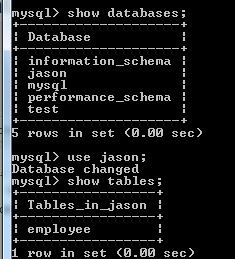
#!/usr/bin/python
from mysql import connector
import optparse

parser = optparse.OptionParser()
parser.add_option('-i', action="store", help="Enter Job ID#", type="int")
parser.add_option('-n', action="store", help="Enter Employee Name", type="string")
parser.add_option('-d', action="store", help="Enter Department", type="string")
parser.add_option('-s', action="store", help="Enter Salary", type="int")
options, args = parser.parse_args()

def databaseAdd(id,name,dept,salary):
    con = connector.Connect(user='jason',
                            password='password',
                            database='jason',
                            host='localhost')
    c = con.cursor()
    table_name = "employee"
    insert = "INSERT INTO " + table_name + " (id,name,dept,salary) \
    VALUES (%s, %s, %s, %s)"
    data_value = (id,name,dept,salary)
    c.execute(insert, data_value)
    con.commit()
    c.close()
    con.close()

databaseAdd(options.i ,options.n,options.d,options.s)
Here is how you can see the help and call the command properly: 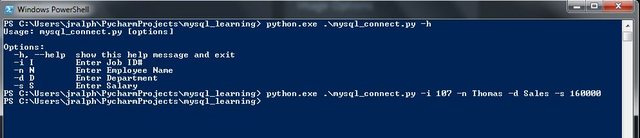
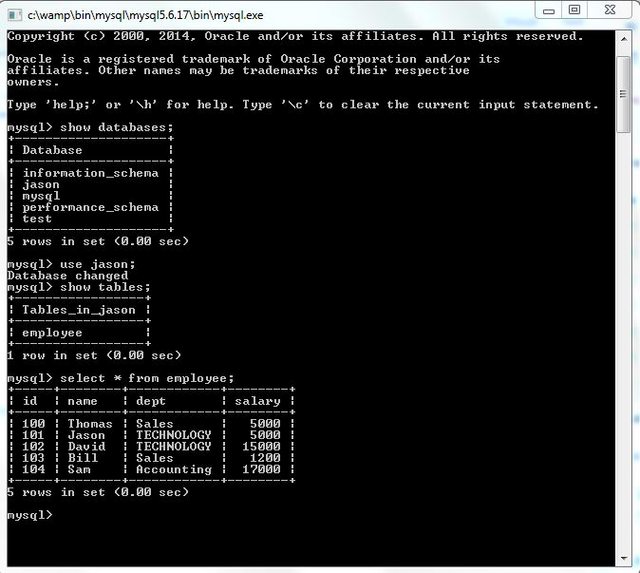
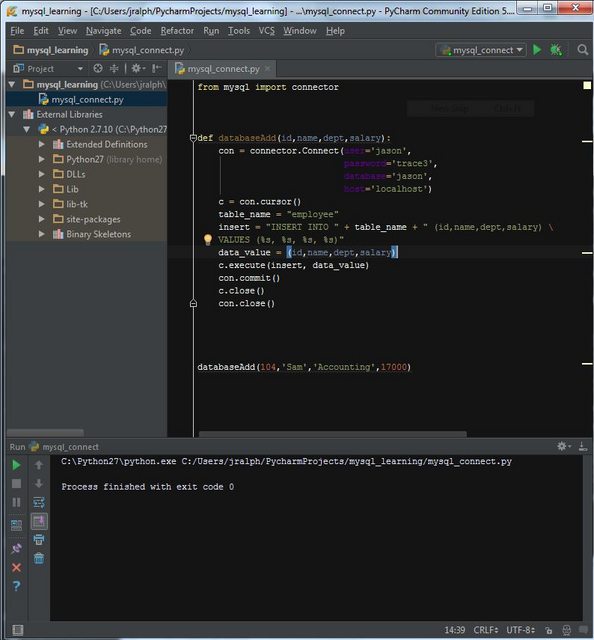
from mysql import connector
import sys
import optparse


parser = optparse.OptionParser()
parser.add_option('--id', action="store", help="Enter ID number", type="int")
options, args = parser.parse_args()


try:
    cnx = connector.Connect(user='jason',
                        password='password',
                        database='jason',
                        host='localhost')
except connector.Error as err:
    print "Connection to Database Failed"
    print err
    sys.exit(1)


cursor = cnx.cursor()
query = "SELECT * from employee WHERE id='%s'" % options.id
cursor.execute(query)
for row in cursor:
    print row
Here is the output of the fetch command using ID as a parameter: 